

2D & 3D Asset Optimization Guide: Atlas, LOD & Performance
· #game optimization #game development #game dev #3d modeling #pixel art #godot engine
Learn how to optimize 2D and 3D assets using texture atlases, levels of detail (LOD), and compression to ensure high frame rates and lightweight games.
Every indie developer has experienced the dreaded moment when a game prototype starts dropping frames per second for no apparent reason. Most of the time, the villain isn't a poorly written script, but the way the graphics card (GPU) handles the excessive amount of textures, vertices, and draw calls sent by the processor (CPU). Knowing how to balance visual fidelity with technical performance is one of the most valuable skills in modern game creation.
The Silent Bottleneck: Draw Calls and VRAM
To optimize any project, we first need to understand what causes frame rate drops (stuttering and FPS drops). Two main factors usually drag down graphical performance:
- Draw Calls: Every time the CPU needs to tell the GPU to render an object with a different material or texture, a draw call occurs. Hundreds or thousands of these calls per frame overwhelm the communication channel between the two chips.
- Video Memory Consumption (VRAM): Gigantic, uncompressed textures occupy precious space in VRAM. When the card exhausts its dedicated memory, it starts using system RAM, causing drastic freezes in the game.
Next, we will look at how to solve these two problems in both the 2D and 3D pipelines.
2D Asset Optimization: Texture Atlases and Sprite Sheets
In 2D development, it is common to accumulate hundreds of loose PNG files: inventory items, map tiles, visual effects, and character poses. If each image is handled individually by the engine, every sprite on screen will generate a separate draw call.
The Power of the Texture Atlas
A Texture Atlas (or Sprite Sheet) is a large image that groups dozens of small sprites into a single texture. By using an atlas, the engine loads only one image file and uses UV coordinates to crop the correct sprite at runtime.
- Drastic Reduction in Draw Calls: Since dozens of objects share the same texture and material, the engine can combine them into a single rendering batch (dynamic batching).
- Fewer GPU Context Switches: The GPU doesn't need to constantly swap textures while drawing the same frame.
- Tilemap Organization: Assembling environments using tilesets organized in atlases reduces memory usage and speeds up the rendering of background layers.
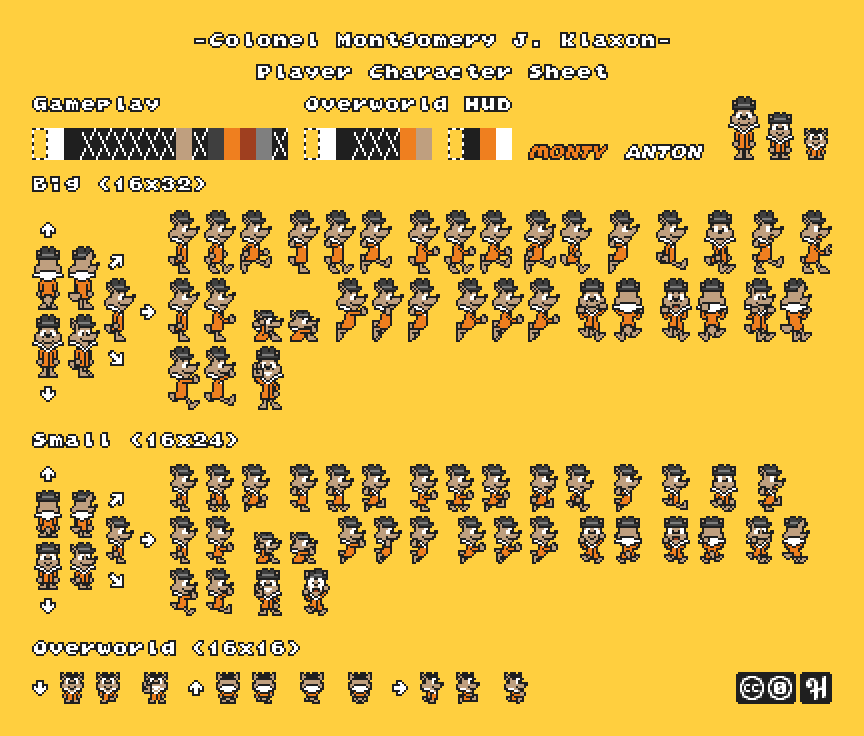 Sprite sheet gathering multiple animation frames into a single continuous texture. — Image: Jayvee Enaguas (The Harvett Vault) · Public domain · Wikimedia Commons
Golden Rules for 2D Textures
- Power of Two (POT): Keep sheet dimensions in powers of two (such as 512x512, 1024x1024, or 2048x2048 pixels). Graphics chip architecture was historically designed to allocate this format with maximum efficiency.
- Proper Padding: Always leave a minimum margin (2 to 4 pixels of padding) between sprites in the atlas to prevent texture bleeding when applying camera filters or mipmaps.
- Transparent Space Trimming: Remove unnecessary empty pixels around sprites before packing them in specialized tools.
3D Asset Optimization: Levels of Detail (LOD) and Meshes
In the 3D universe, the number of polygons visible simultaneously has a direct impact on vertex processing time (vertex shader). Rendering a monster composed of 50,000 triangles makes sense in a cinematic close-up, but it is an unforgivable waste if it is 40 meters away and occupying 20 pixels on screen.
What is LOD (Level of Detail)?
The Level of Detail (LOD) technique consists of creating alternative versions of the same 3D model with decreasing polygon counts. The game engine automatically detects the camera's distance and switches between these versions:
- LOD 0: Full high-resolution model, rendered when the player is very close to the object.
- LOD 1: 30% to 50% triangle reduction. Used at medium distances, maintaining the main silhouette without noticeable loss.
- LOD 2 and beyond: Extremely simplified model (70% to 85% reduction), focused only on basic geometric shape.
- Impostors / Billboards: At extreme distances (like forests on the horizon), the three-dimensional model can be replaced by a static 2D plane that always faces the camera.
 Polygonal mesh editing and modifier management in Blender. — Image: Pignol23 · CC BY-SA 3.0 · Wikimedia Commons
Retopology and Normal Maps
Instead of keeping hyper-detailed geometries directly on the mesh, the modern workflow uses the normal map baking technique. You sculpt the detailed model in Blender to extract relief information into a texture, then apply it to a low-poly version. The visual result simulates realistic micro-details with a tiny fraction of the computational cost.
Texture Compression: VRAM vs. Disk Storage
There is a classic confusion among novice developers: thinking that saving an image in a highly compressed PNG or JPG reduces memory consumption on the graphics card.
PNG and JPG files are compression formats for disk storage. When the game loads these files, the CPU decompresses them entirely into raw bitmaps in VRAM. An uncompressed 2048x2048 texture consumes about 16 MB of VRAM, regardless of whether the file is only 500 KB on disk.
Hardware-Supported Block Formats
To truly save VRAM, we must use formats natively supported by the GPU:
- Desktop and Consoles: BC (Block Compression) families like BC1, BC3, and BC7 (in DirectX/Vulkan).
- Mobile Devices: ASTC or ETC2 standards, widely supported on Android and iOS smartphones.
These formats keep the image compressed directly in the GPU memory, freeing up rendering bandwidth and allowing the game to load much sharper textures on modest hardware.
Build from Scratch or Use Ready-Made Packs?
Setting up complex atlases, sculpting meshes, doing meticulous retopology, and manually generating three or four LOD levels for every enemy or level prop demands dozens of hours of technical labor.
For solo developers and small indie teams, spending too much time on manual topology tasks usually delays the delivery of gameplay mechanics. Therefore, using professional asset packs developed with good market practices—well-distributed meshes, aligned sprite sheets, and optimized materials—is a smart strategy to shorten the schedule without sacrificing the technical stability of the final version.
Conclusion
Asset optimization should not be left for the final weeks before launch. By adopting the systematic use of Texture Atlases in 2D, implementing LOD groups in 3D, and correctly configuring texture compression in your engine's settings, your game will run smoothly, stably, and accessibly for as many players as possible. The direct result of this care is a more professional game, with fewer stutters and much more positive reviews from the community.